Moments
Work Project
Overview
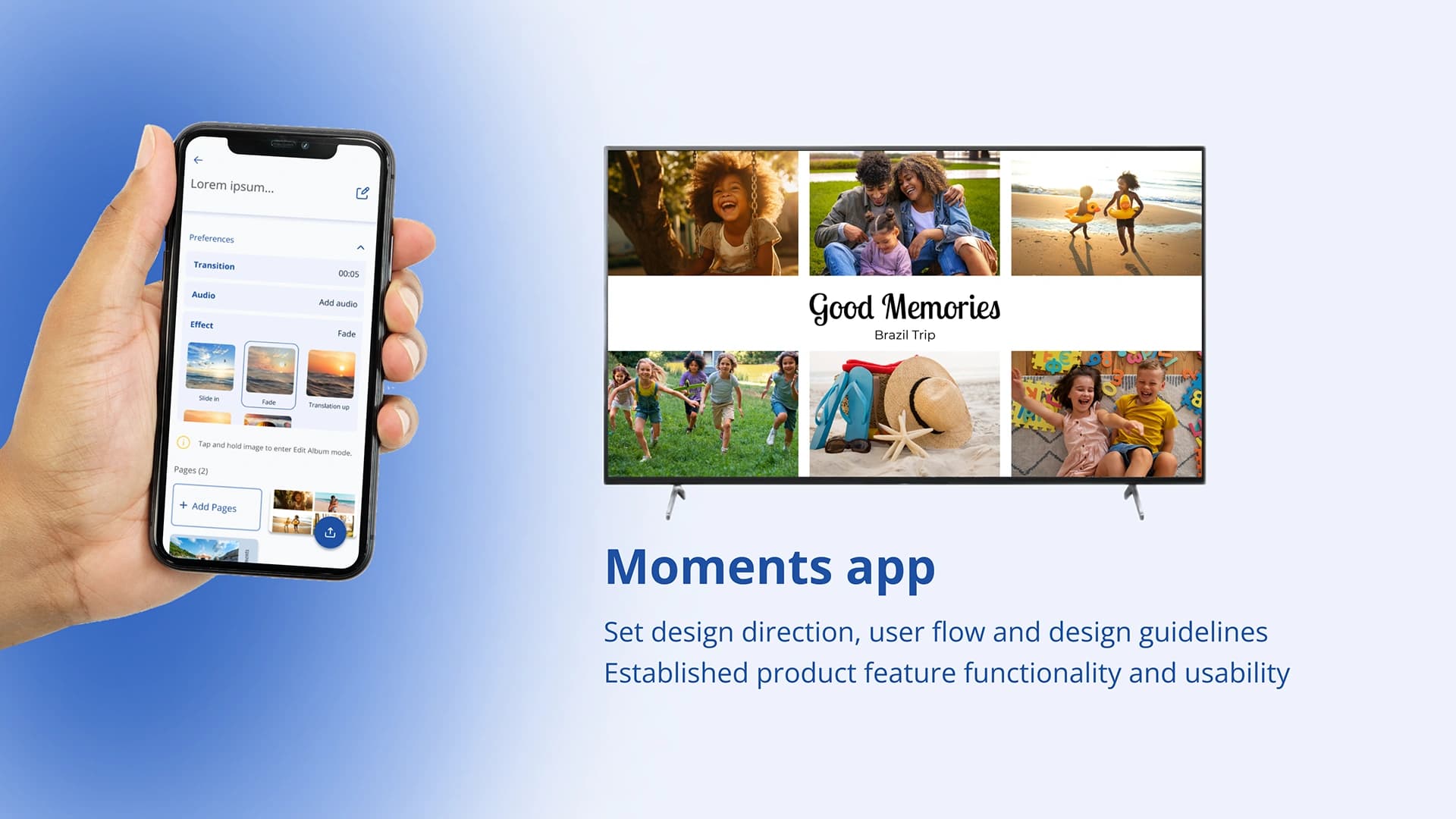
The Moments project eased the pain point of sharing photos to the TV, replacing tedious methods like USB and HDMI cables to a seamless mobile to TV solution.
As the design lead, I established the app's visual direction, user flows and key features, while addressing software and hardware constraints like TV storage and OLED burn in risks.
I ensured a cohesive user experience through competitor research, cross-functional collaboration and iterative feedback remotely with the designer and lead developer working on this project.
Scope
Branding and design direction, design guidance/collaboration - iterative feedback and review
Team
This project was a cross-continental (11 hours difference in time zone!) collaboration between our Singapore office and the Brazil innovation team.
I worked closely with the requirements and technical teams in Singapore. Collaborating with Lorena - the main designer and Mateus, the lead developer from Brazil.
Objective and target audience
The main objective was to have an easier way for consumers to share their joyful moments (photos) from their mobile phone to the TV. This is catered for large family and friend gatherings such as weddings, baby showers, family get-togethers, where sharing experiences can happen in a seamless and fun manner.
The beginning of our collaboration - Concept sharing
The Brazil team shared an initial concept of the flow and design with us based off their commercial use-case app. As their main role in the collaboration was the implementation and execution, I was in charge of the design direction and flow for the app.
Agreeing on requirements and creating user flows
The requirements was agreed upon Brazil and SG team, with the detailed features and technical dynamic for TV and mobile mapped out. I created the user flows with the understanding of the requirements and technical constraints for both features - Quick Album and Customised / Template Album.
Photo sharing app research
For the customised or template album UI, I referred to Canva mainly because there was a similar function of adding images to a template picture or photo collage.
Setting design direction and guidelines with accessibility
I established the colours, text, layout by experimenting with the template album concept. Then I refined this into a design guideline to pass onto the Brazil team designer to expand on. Colours are checked with the contrast checker to ensure that it meets WCAG standards.
Mitigating hardware risks with OLED TVs
One of our design iterations included resolving the risk of burn-in for OLED TVs. I collaborated with the Picture Quality (PQ) expert from our SG site, where we validated solutions based on the factors that caused OLED burn in.
Our proposed solution involved two main approaches:
- Have a neutral background against our templates to reduce the LED brightness
- Have randomised transition effects between images to increase movement across the TV screen
When validating the concept with the PQ expert, I simulated these interactions (neutral background, various transition effects) by prototyping templates. We evaluated internally (requirements, design, PQ, technical teams) and proposed these solutions for Brazil to implement.
Catering for Language Translation
When the design has been finalised and development was ongoing, the Brazil site designer and lead developer reached out for advice on accommodating language translations across eight languages. I focused on the components most impacted by translation - particularly for the longest language Russian.
Below is an excerpt of the translated UI screens from the Brazil team.
I defined how text and components should behave to accommodate varying lengths and alignments. Collaborating with the Brazil site designer and developer in Figma, I provided detailed guidelines to ensure a clean UI across all supported languages.
Moments Quick Album
The Quick Album feature lets users effortlessly share cherished memories from their mobile to a compatible TV. Users can create a personalised album by selecting photos from their phone gallery, adding an audio track, and customise transition timing. Once ready, they can instantly send the album to a paired TV via the Moments app, turning their living room into a dynamic photo showcase.
Moments Template Album
The Template Album feature gives users more creative freedom when sharing photos. Users can add images to pre-designed templates, customise the background and text, and enhance their album with transition effects. It's a simple way to make photo sharing more personal and visually engaging.
Learnings
Throughout this project, I facilitated all design decisions from naming, logo creation, styling, design and down to the details of implementation like translation.
I learned to lead by understanding the hardware and software constraints from the SG team, in order to guide design decisions and explanation when communicating with the Brazil designer and lead developer asynchronously.
This project also reinforced the importance of cross-functional and trust in a remote collaboration, as I worked with the Brazil team to align on the design and navigate the differences in time zone.