Smart TV app
Work Project [some info redacted]
Overview
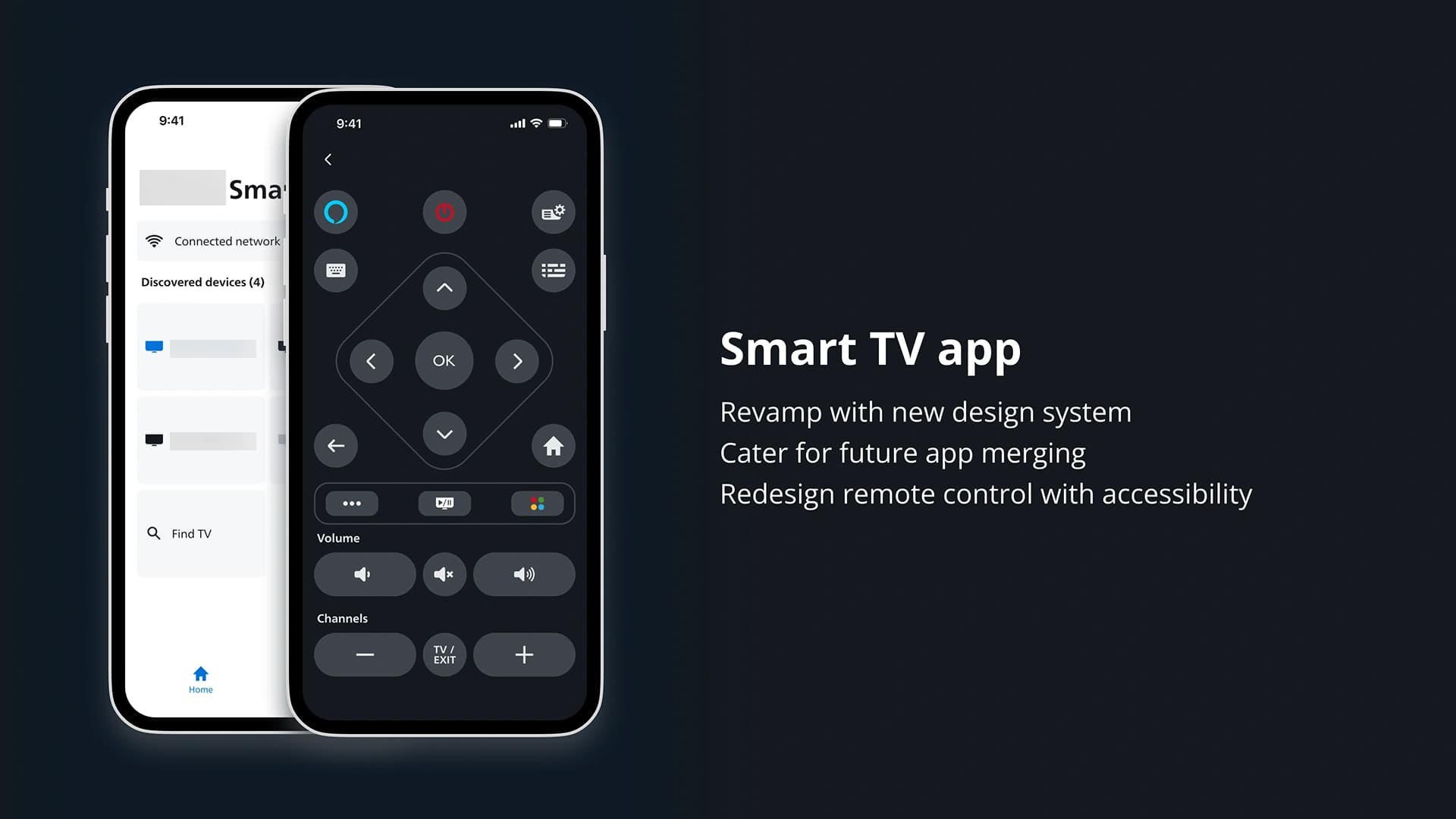
Smart TV app is an interactive app for users to control certain functions on their TV from their phone. I was the lead designer for the project, working with a new design system to revamp the mobile interface (UI), app structure (UX) and design a new TV remote control in-app.
Company related info is redacted to respect company privacy. I can share more detail in a case study run-through as part of the interview stage.
Scope
Competitor research, UI/UX Design, prototyping, user-testing
Team
One designer (me) liaising with the lead developer.
Stakeholders include the external business design leader (to get design approved officially); internal mobile app owners (Speakers and Headphones); my team - another UI/UX designer (separate projects) and design manager for input/feedback.
Current Design
The need for a redesign is not only due to the older UI look and feel.
Problem Space / Why
The company we are revamping the product for has refreshed its identity with a new design system. This will roll out across multiple brand licensees including us. There was a priority to minimise and simplify the number of apps users have to download for their suite of products.
As our business covers TV and sound devices, there was a business decision to merge TV and sound devices. In this mobile app revamp, we cater for future merging of the Smart TV app and sound/speaker app.
Goals
- UI Revamp current mobile UI with new and improved company Design System
- UX Reorganise app structure to prepare for merging with Speaker app
- UX Redesign the app remote control for TV
Interview, Map, Research
I started first by understanding the structure of the existing app and mapping out its UI. Then I clarified the flow with the lead developer/app owner. Below is the flow for the Smart TV app. The UI portion is redacted.
I mapped out the same flow with the company's Speaker app, as Smart TV app will eventually merge with the Speaker app. The old structure of Smart TV and the current Speaker app is quite different. The UI portion is redacted.
Research competitor apps
I looked at popular mobile apps others used for controlling TV. Focusing on app structure based on their UI, a lot of them list out devices in the home page. This makes the app scalable for other products beyond TV down the line, which fits our intention for Smart TV.
Mapping out both the current Smart TV and Speaker app in Figjam in terms of structure, flow and UI enabled me to understand the key differences between the apps. With the research in mind, I adapted what will be the revamped Smart TV app to align with a similar structure of Speaker App.
After clarifying the structure of the existing app and the future app it will merge into, I proceeded with building out the structure of what would be the new Smart TV app.
Final Design for the UI Revamp
With a suitable and scalable app structure in place for future merging, I proceeded to redesign with the latest version of the Design System that rolled out at the time. The screens below are a sample only, as most are redacted.
Through multiple iterations and conversation with the Business Design leader, we got the unofficial approval for this UI below. The approval was not yet official as we have one last major section of the project to do.
App remote control for TV
After completing the first two goals of the project, I delved into the last one which was a mini project in itself: designing a remote control in-app for TV. This was my first time designing for an interactive product from a mobile device to a TV.
Research competitor remote control apps
I looked at remote control apps with higher reviews across Play/App Store, including TV competitors like Samsung, Google and Apple TV.
The common takeaways I took from the research were:
- Larger buttons to accommodate accessibility and finger size similar to a physical remote control
- Swiping motion UI for navigating up, down, left, right and to have this option on top of the usual D-pad design on remote controls
- Minimal buttons to avoid overwhelming users (I eventually found data from our company's physical remote control usage on which buttons users click on the most)
Old TV app remote control
This is the current version of the Remote Control (RC) before the redesign. There were improvements to be made such as colour keys being made as visibly press-able buttons, and larger button sizes.
Considerations:
- Layout had to accommodate contextual buttons e.g. Alexa Voice assistant
- New buttons/functions stakeholders want in the remote control (RC)
- Necessary buttons like volume and channels, home and back key will be brought into the new design in a similar manner
Design, user-test and stakeholder reviews
Starting the design stage, I came up with wireframes and experiment with different styling with new UI in Stage 1 and 1.5 below. Interactions were prototyped and I did some user testing with both people around office who were and were not part of the project.
I was in constant communication with the Business Design leader as he would be the person to approve our design officially. I wanted to ensure we were going in the right direction across different domains:
- Business/Brand alignment with our Business design stakeholder
- Research: competitors and our own data analytics for buttons used
- Technical: what was realistic for implementation with our lead developer/app owner for the project
Final Design for app remote control
After Stage 2 (in image above), we had further iterations before finalising on the design below listed under Stage 3.
New bottom sheet design
- Bigger buttons in the main page for greater accessibility
- Decrease the number of buttons on the main page based on our previous physical TV remote control data
- User-testing showed the bottom half of the phone was most reachable by thumb, so having extra features accessible is a mitigating factor for not providing it on the main page.
I had to manage the disagreement from internal parties by holding meetings to discuss my design decisions. My priority was for the main stakeholder to agree with the design, so it can be handed off in time to development for execution.
Final Design in Dark Mode
When all was finalised, I created a dark mode version of the UI based off the colour palettes in the new Design System.
Final Design
The final design for both the Smart TV app UI and remote control app UI was submitted and approved officially by the company.
Learnings / Next Steps
The current implementation is underway, and I am collaborating closely with the lead developer to refine the design with minor adjustments during the development process.
This project was my first venture into designing for interactive products, which was challenging and rewarding. I particularly enjoyed creating the app's remote control interface, user-testing with prototypes to simulate and validate common user interactions with the TV.
Finalising and receiving official approval for the design was a satisfying milestone, and I'm eager to gather real user feedback from Smart TV app users once the implementation is complete.